CloudGuru
JA

Author

Junaid Ahmed

No biography added yet.

37 articles

Entra ID1 min read

The 4 Critical Entra ID Policies to Deploy Today (with Terraform)

If you’re managing Entra ID (Azure AD), you’re facing constant attacks. The single most effective way to protect your tenant is with Conditional Access. But don’t just click around in the portal—deploy your security as code. We’ll build a simple, modular, and production-ready Terraform framework to deploy this “Top 4” set. The “Top 4” Critical …

Windows Hello for Business3 min read

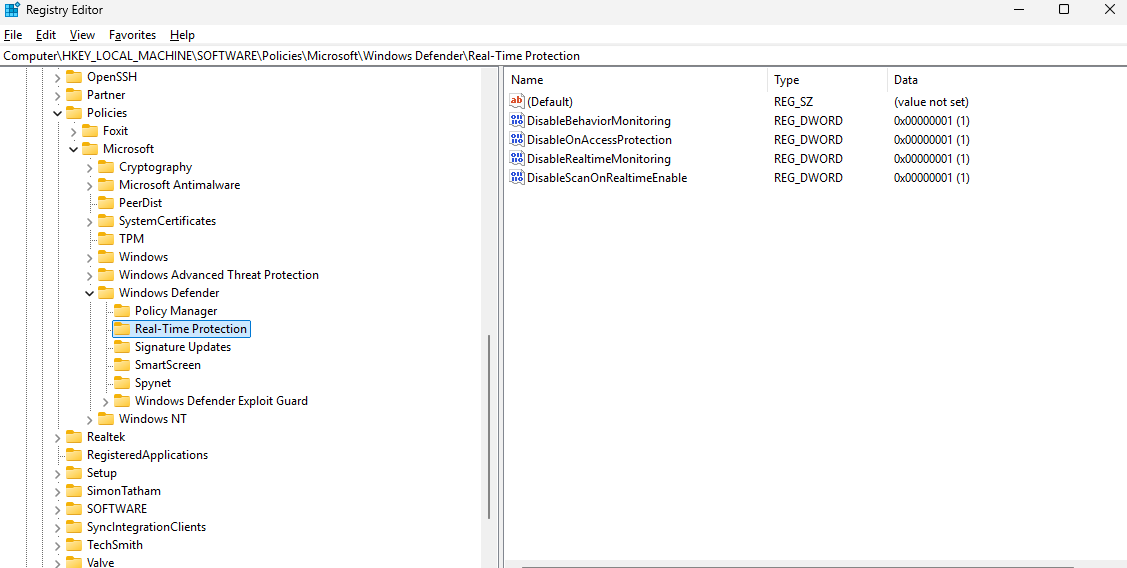
How to Permanently Disable Windows Defender on Windows 11

Disabling Windows Defender (now called Microsoft Defender Antivirus) may be necessary for developers, software testers, or IT professionals. Deactivation allows for testing applications without interference or for installing a third-party antivirus solution. Important: Disabling Defender leaves a system unprotected. Always re-enable security features after testing to protect against viruses and malware. When Should You Disable Defender? …

Entra ID4 min read

CVE-2025-55241 (Actor Token / Entra ID) — What You Need to Know

Introduction A critical flaw in Microsoft Entra ID (formerly Azure Active Directory) — CVE-2025-55241 — reminds us how fragile cloud identity can be when legacy token flows linger. While Microsoft has already patched the issue, the lessons go far beyond a single CVE. At Terait, we help organizations secure Entra ID and Azure identity services. …

Linux2 min read

How to Access Vaultwarden via a Custom Domain on CyberPanel (with SSL)

If you’ve deployed Vaultwarden in Docker and want to access it securely via a custom domain (like vault.yourdomain.com) instead of an IP and port, this step-by-step guide will help you achieve it using CyberPanel and OpenLiteSpeed. In this tutorial, I’ll show you how to expose Vaultwarden (running on http://<server-ip>:8062) under a subdomain with SSL encryption. …

Azure4 min read

Crafting a Robust Naming Convention in Microsoft Entra ID

In today’s rapidly evolving digital landscape, a sound identity governance strategy is paramount. Central to this strategy is a clear and consistent naming convention for Microsoft Entra ID (formerly Azure Active Directory) objects—ranging from Security Groups and Conditional Access Policies to Applications and Administrative Units. A well-designed naming convention ensures discoverability, automation readiness, security compliance, …

Azure3 min read

A Detailed Guide to Locating and Reviewing Logs for Azure Update Manager

When troubleshooting patching issues or assessing update compliance, finding the right log files is critical. The logs provide insights into agent activities, patch assessments, and update installations. This guide covers the various log locations depending on whether you’re working with Azure VMs or Azure Arc‑enabled servers, and explains how to query centralized update assessment results. …

Entra ID4 min read

Access Review vs. Access Package in Microsoft Entra ID: Key Differences and Use Cases

Introduction Managing access to resources in any organization is crucial for security, compliance, and operational efficiency. Microsoft Entra ID (formerly Azure AD) provides governance features to help organizations control who has access to what and ensure that access is granted appropriately. Two key features that help with access management are: Although both play a role …

Entra ID2 min read

Managing Enterprise App Registrations in Entra ID

Why Do You Need This Script? Organizations register applications in Entra ID to authenticate users and grant access to Microsoft services. However, some apps:🔹 Lose valid secrets or certificates and stop working🔹 Remain unused for long periods but retain permissions🔹 Can be exploited if left unmanaged IT administrators need to identify unused applications and those …

Entra ID2 min read

Managing Guest Users in Entra ID with PowerShell

Why Do You Need This Script? Guest users in Entra ID (formerly Azure AD) are external users invited to collaborate within an organization. However, many guests:🔹 Never accept their invitations🔹 Stop using their accounts after a period of time🔹 Pose a security risk if their access isn’t revoked To maintain security and compliance, IT administrators …

Azure3 min read

Azure Alerts vs. Action Rules (Processing Rules): What’s the Difference?

When it comes to monitoring and managing your Azure resources, Azure Alerts and Action Rules (formerly known as Processing Rules) are two powerful tools in Azure Monitor. While they both play a role in alert management, they serve different purposes and operate at different stages of the alert lifecycle. Let’s break down the differences and when to use each. …

PowerShell2 min read

PowerShell Script to Export Users’ Last Password Reset Dates to CSV

If you need to export the list of users in your Active Directory along with their last password reset or update date, here’s a simple PowerShell script that will help you achieve that. The script retrieves the PasswordLastSet property for all users and exports the results into a CSV file for easy analysis. PowerShell Script: …

PowerShell2 min read

PowerShell Script Logging and Debugging: A Comprehensive Guide

If you’re working on a PowerShell script and want to log all activities or debug it effectively, here’s a detailed guide to help you. This post will cover how to enable verbose output, handle errors, and implement global settings to streamline your debugging process. Enable Verbose Output PowerShell provides a built-in verbose stream for detailed …

Monitoring3 min read

Guide on Configuring Prometheus Blackbox Exporter and Grafana

The Prometheus Blackbox Exporter is a flexible and powerful tool used to monitor endpoints over various protocols such as HTTP, HTTPS, TCP, and ICMP (ping). This guide will walk you through everything you need to know about setting up and configuring the Blackbox Exporter with Prometheus, including writing configurations, setting up Docker Compose, and using …

Uncategorized3 min read

Elevate Security: Configuring FIDO2 Security Keys as the Default Login Option for Windows Devices

As organizations embrace the transition to passwordless authentication, FIDO2 security keys have emerged as a robust, user-friendly solution. These keys not only enhance security but also streamline the login experience for end-users. This guide explores how to configure FIDO2 security keys as the default login option for Windows devices, utilizing Microsoft Intune to simplify deployment and management. Why Choose …

Linux2 min read

How to Install DietPi on Proxmox Server: A Step-by-Step Guide

If you’re looking to run DietPi on your Proxmox server, you’re in the right place! This lightweight, optimized Linux distribution is perfect for a range of applications and is easy to set up on Proxmox. In this guide, we’ll walk you through downloading the DietPi image, decompressing it, and configuring it as a virtual machine …