
If you’re managing Entra ID (Azure AD), you’re facing constant attacks. The single most effective way to protect your tenant is with Conditional Access. But don’t just click around in the portal-deploy your security as code.
We’ll build a simple, modular, and production-ready Terraform framework to deploy this “Top 4” set.
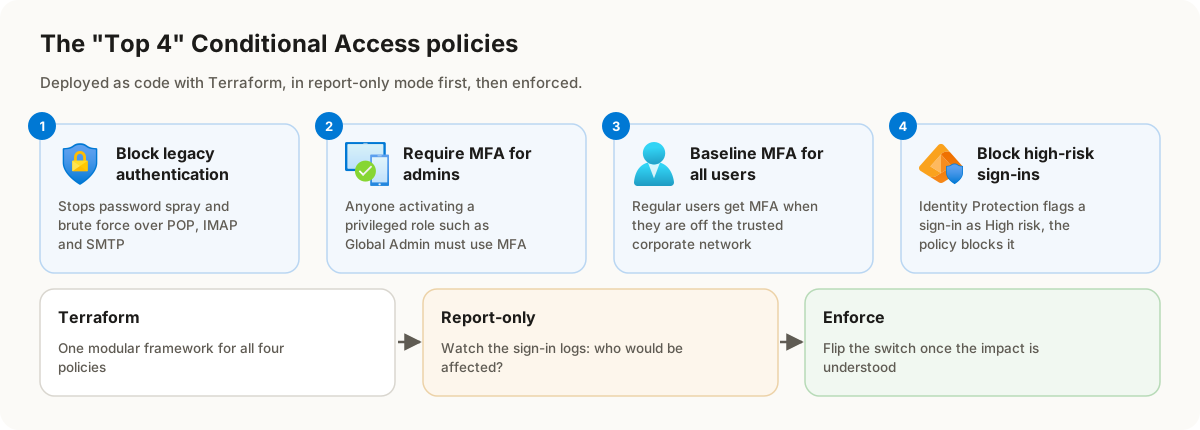
The “Top 4” Critical Policies
- Block Legacy Authentication: This is your #1 defense. It single-handedly stops password spray and brute-force attacks by blocking old, non-MFA-capable protocols like POP, IMAP, and SMTP.
- Require MFA for Admins: Your admin accounts are “Tier 0.” This policy ensures that anyone activating a privileged role (like Global Admin or Security Admin) is always forced to use MFA. No exceptions.
- Baseline MFA for All Users: This is your main “shield.” We’ll set up a smart policy that requires MFA for all your regular users only when they are off the trusted corporate network.
- Block High-Risk Sign-ins: Let Microsoft’s machine learning do the work. This policy automatically blocks any sign-in that Entra ID’s Identity Protection flags as “High” risk (e.g., an anonymous IP, impossible travel).
Deploying Safely
The best part of this framework is how we deploy. We’ll set the user-facing policies to “Report-Only” mode first. This lets you monitor the Entra ID sign-in logs and see exactly who would be impacted before you “flip the switch” and enforce the policy.
This is the fastest, safest, and most robust way to secure your tenant.
Check out the full video for a step-by-step walkthrough, and get the complete, copy-paste-ready Terraform code on my GitHub.