
From Local Ollama Models to a Public OpenAI-Compatible API
Running multiple AI models locally is becoming increasingly practical. With Ollama, you can run models such as Llama, Qwen, and DeepSeek on your own hardware. At the same time, cloud providers such as Anthropic, OpenAI, and Google provide access to much larger hosted models.
The problem is that every application tends to expect a slightly different API, authentication mechanism, model name, and endpoint.
A better architecture is to place a unified AI gateway in front of all of these providers.
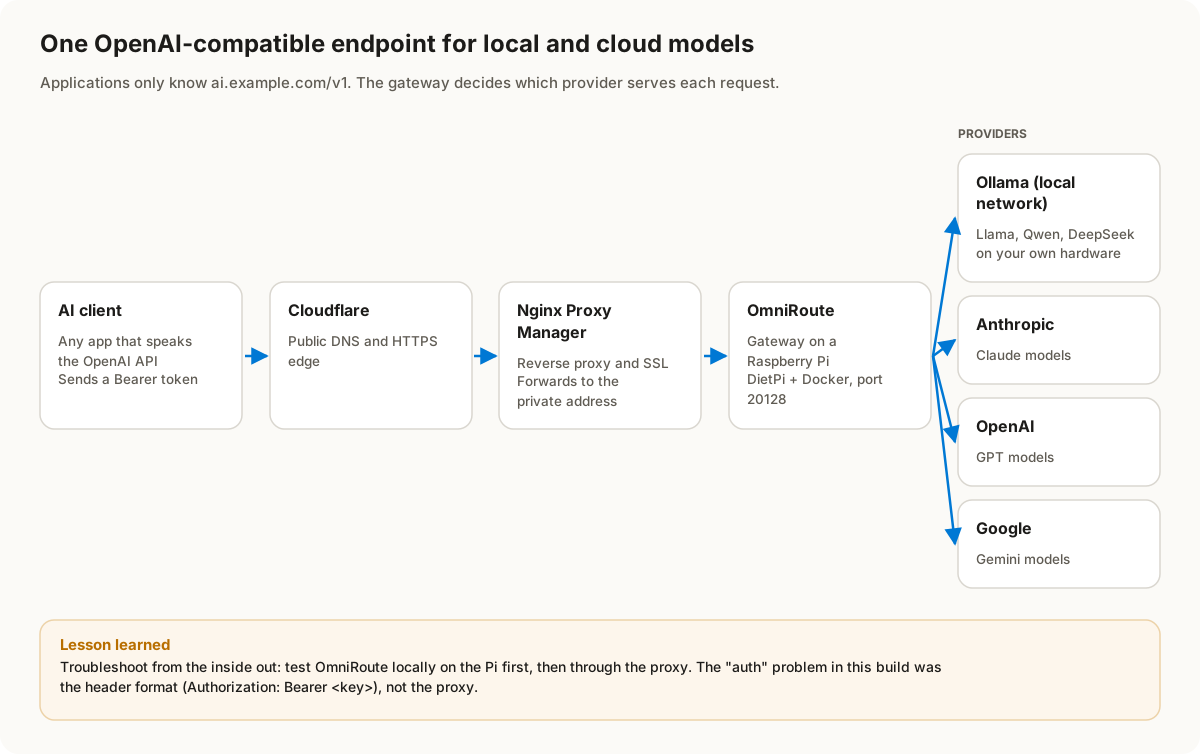
In this project, I used OmniRoute as that gateway and exposed it through a reverse proxy using a custom HTTPS domain. The final result was an OpenAI-compatible endpoint that applications can use without needing to know whether the underlying model is running locally or in the cloud.
This article documents the complete process, including the problems encountered along the way and how they were resolved.
1. The Goal
The objective was to build something like this:
                    AI Client
                       │
                       ▼
             https://ai.example.com
                       │
                  Cloudflare
                       │
                       ▼
             Nginx Proxy Manager
                       │
                       ▼
                OmniRoute
                       │
          ┌────────────┼────────────┐
          │            │            │
          ▼            ▼            ▼
       Anthropic      OpenAI       Gemini
          │
          │
          ▼
       Ollama
          │
    ┌─────┼─────┐
    ▼     ▼     ▼
   Qwen  Llama DeepSeek
The important design goal was that applications would only need to know about one endpoint:
https://ai.example.com/v1They would not need separate configurations for every provider.
2. Why Use a Gateway?
Without a gateway, every application needs its own provider configuration.
For example:
Application A → OpenAI
Application B → Anthropic
Application C → Gemini
Application D → Ollama
Application E → Another local model
This becomes difficult to maintain.
You also end up with:
- Multiple API keys
- Different API endpoints
- Different model naming conventions
- Different authentication mechanisms
- Different request formats
- Different logging and monitoring
- Different configuration for every application
With a gateway:
                    ┌── OpenAI
                    │
                    ├── Anthropic
Client → OmniRoute ─┼── Gemini
                    │
                    └── Ollama
The client only needs to know about OmniRoute.
3. Hardware and Network Architecture
The gateway was hosted on a Raspberry Pi running DietPi.
The actual addresses are intentionally anonymized in this article.
For example:
Raspberry Pi:
192.168.1.50

Ollama server:
192.168.1.100

OmniRoute:
192.168.1.50:20128
The actual production environment used different addresses.
The Raspberry Pi was already running Docker, which made it a convenient host for the gateway.
4. Existing Docker Environment
Before installing the gateway, the Raspberry Pi contained several Docker workloads.
There were multiple application containers, PostgreSQL databases, Redis instances, workers, schedulers, and buildkit containers.
The first task was therefore to clean up old workloads that were no longer required.
Containers were removed using:
docker rm -f <container-name>Afterward, unused Docker networks were cleaned up:
docker network pruneThis is an important distinction:
Removing containers does not necessarily remove their Docker networks or volumes.
Docker volumes were intentionally treated more carefully because they can contain persistent application data.
For example:
docker volume lsshould be reviewed before removing anything.
Do not blindly execute:
docker volume pruneon a server containing data you may need.
5. Portainer for Docker Management
Portainer Community Edition was also useful for managing the Docker environment.
The Portainer Agent was deployed on the Raspberry Pi:
docker run -d \
  -p 9001:9001 \
  --name portainer_agent \
  --restart=always \
  -v /var/run/docker.sock:/var/run/docker.sock \
  -v /var/lib/docker/volumes:/var/lib/docker/volumes \
  portainer/agent:latest
This allowed the Docker host to be managed from a central Portainer installation.
6. Connecting Ollama
The next part was connecting the gateway to an Ollama server.
The Ollama server was running on another machine on the local network.
For example:
Ollama:
192.168.1.100:11434
Ollama exposes an HTTP API, which makes it possible for another application on the network to communicate with the local models.
The important requirement is that the OmniRoute host must be able to reach the Ollama server.
A simple connectivity test is:
curl http://192.168.1.100:11434/api/tagsIf the connection is successful, Ollama should return its model list.
7. Models Available Through Ollama
The local Ollama installation contained several models.
Examples included:
qwen35-chat:latest
qwen3.5:2b
qwen35-stable:latest
qwen35-fast4k:latest
deepseek-r1-research:latest
llama3.2-chat:latest
There were also embedding models such as:
embeddinggemma
nomic-embed-text
bge-m3
One important lesson here is that an embedding model should not normally be treated as a general chat model.
For example:
llama3.2-chatis appropriate for chat/completion workloads.
Whereas:
nomic-embed-text
bge-m3
are primarily useful for embeddings and retrieval workloads.
8. Connecting Cloud AI Providers
The gateway was also configured with cloud AI providers.
The architecture therefore became:
                 OmniRoute
                    │
       ┌────────────┼─────────────┐
       │            │             │
       ▼            ▼             ▼
   Anthropic       OpenAI       Google
       │            │             │
       ▼            ▼             ▼
    Claude          GPT         Gemini
The provider credentials should be stored securely.
Never hard-code API keys into scripts or publish them in documentation.
9. Creating a Public Endpoint
Once the gateway was functioning locally, the next goal was to expose it through HTTPS.
The public architecture was:
Internet
   │
   ▼
Cloudflare
   │
   ▼
Nginx Proxy Manager
   │
   ▼
OmniRoute
A dedicated subdomain was used:
https://ai.example.comThe internal OmniRoute service remained on a private network address and port:
192.168.1.50:20128This is preferable to exposing the application port directly to the Internet.
10. Nginx Proxy Manager Configuration
Nginx Proxy Manager was used as the reverse proxy.
A proxy host was created for:
ai.example.comThe forwarding configuration pointed to:
Scheme: http
Host/IP: 192.168.1.50
Port: 20128
SSL was then configured for the public hostname.
The important concept is:
HTTPS client
     ↓
Nginx Proxy Manager
     ↓
HTTP OmniRoute
The internal traffic does not need to be publicly exposed.
11. Cloudflare
The DNS record was configured through Cloudflare.
Conceptually:
ai.example.com
        ↓
Cloudflare
        ↓
Public IP
        ↓
Reverse Proxy
        ↓
OmniRoute
Cloudflare provided the public DNS and HTTPS edge.
The actual domain used in the production environment is intentionally not shown here.
12. The Authentication Problem
This was where one of the most confusing issues occurred.
Initially, a request to:
https://ai.example.com/v1returned:
{
  "error": {
    "message": "Authentication required",
    "type": "invalid_api_key",
    "code": "invalid_api_key"
  }
}
At first glance, it looked like the reverse proxy or Cloudflare configuration was dropping the authentication header.
That assumption turned out to be incorrect.
13. Testing the Public Endpoint
The first test looked similar to:
curl https://ai.example.com/v1/models \
  -H 'Authorization: sk-xxxxxxxx'
This returned:
401 UnauthorizedThe mistake was subtle.
The API expected an HTTP Bearer token.
The correct header format is:
Authorization: Bearer <API_KEY>not:
Authorization: <API_KEY>Therefore the correct request was:
curl https://ai.example.com/v1/models \
  -H 'Authorization: Bearer YOUR_API_KEY'
This immediately changed the result.
14. Why This Was Confusing
The HTTP response contained headers such as:
access-control-allow-headers:
Content-Type, Authorization, x-api-key, ...
This confirmed that the service was prepared to accept authentication-related headers.
It was therefore tempting to assume that the reverse proxy was the problem.
However, testing the service directly on the Raspberry Pi provided the crucial clue.
The local endpoint was:
http://127.0.0.1:20128/v1/modelsTesting authentication locally allowed the reverse proxy to be eliminated from the troubleshooting process.
This is a valuable troubleshooting technique:
Always test the application locally before troubleshooting the reverse proxy.
15. Local Testing
The correct local request was:
curl -i http://127.0.0.1:20128/v1/models \
  -H 'Authorization: Bearer YOUR_API_KEY'
Once this worked, the next test was:
curl -i https://ai.example.com/v1/models \
  -H 'Authorization: Bearer YOUR_API_KEY'
If both returned the model catalog, then the complete chain was confirmed.
16. The Successful Model Request
The final test wasn’t just /v1/models.
A real chat completion was performed.
For example:
curl -s https://ai.example.com/v1/chat/completions \
  -H 'Authorization: Bearer YOUR_API_KEY' \
  -H 'Content-Type: application/json' \
  -d '{
    "model": "ollama-local/llama3.2-chat:latest",
    "messages": [
      {
        "role": "user",
        "content": "Say hello in one sentence."
      }
    ]
  }'
The response was an OpenAI-compatible chat completion:
{
  "object": "chat.completion",
  "model": "llama3.2-chat:latest",
  "choices": [
    {
      "message": {
        "role": "assistant",
        "content": "Hello!"
      }
    }
  ]
}
This was the important milestone.
It proved that the system was not merely exposing the model catalog.
An actual inference request was successfully routed through the entire infrastructure.
17. Final Architecture
The final architecture looked like this:
                         INTERNET
                            │
                            ▼
                    ai.example.com
                            │
                            ▼
                       Cloudflare
                            │
                            ▼
                 Nginx Proxy Manager
                            │
                            ▼
                    OmniRoute :20128
                            │
            ┌───────────────┼────────────────┐
            │               │                │
            ▼               ▼                ▼
        Anthropic         OpenAI           Gemini
            │               │                │
            └───────────────┼────────────────┘
                            │
                            ▼
                     Local Ollama
                            │
             ┌──────────────┼───────────────┐
             ▼              ▼               ▼
           Qwen           Llama          DeepSeek
From the application’s perspective, there is now one API:
https://ai.example.com/v118. Using the Gateway From Applications
Applications that support OpenAI-compatible APIs can generally be configured with:
Base URL:
https://ai.example.com/v1

API Key:
YOUR_OMNIROUTE_API_KEY

Model:
ollama-local/llama3.2-chat:latest
The exact configuration depends on the application.
The key point is that the application does not need to communicate directly with Ollama.
Instead:
Application
     ↓
OmniRoute
     ↓
Selected provider/model
This creates a much cleaner architecture.
19. Why This Architecture Is Useful
There are several advantages.
One endpoint
Applications only need one base URL.
https://ai.example.com/v1Provider abstraction
The application does not need to understand every provider’s API.
Local + cloud models
You can combine:
Local:
Qwen
Llama
DeepSeek

Cloud:
Claude
GPT
Gemini
Easier application migration
Instead of changing every application when moving from one provider to another, the gateway configuration can be changed centrally.
Centralized security
API authentication can be handled at the gateway.
Centralized routing
Model selection can be managed centrally.
20. Security Considerations
Exposing an AI gateway to the Internet requires additional security considerations.
Do not treat an OpenAI-compatible API as harmless simply because it is behind a reverse proxy.
At minimum:
- Use HTTPS.
- Require API authentication.
- Use strong, randomly generated API keys.
- Rotate keys periodically.
- Never publish API keys in screenshots.
- Never commit API keys to Git.
- Restrict access where practical.
- Keep OmniRoute and the reverse proxy updated.
- Monitor unexpected API usage.
- Avoid exposing internal administration interfaces publicly.
- Consider additional Cloudflare or reverse-proxy access controls.
One especially important lesson from this project:
API keys should never be included in screenshots, blog posts, terminal transcripts, GitHub issues, or chat messages.
If a key is accidentally exposed, revoke it and generate a replacement.
21. Troubleshooting Lessons
Several small mistakes caused unnecessary debugging time.
Mistake 1: Using Windows-specific commands on Linux
For example:
curl.exeis typically associated with Windows environments.
On Linux/DietPi, use:
curlMistake 2: Using docker ls
Docker does not have:
docker lsUse:
docker psFor images:
docker image lsFor all containers:
docker ps -aMistake 3: Forgetting Bearer authentication
This:
Authorization: sk-xxxxxxxxis not equivalent to:
Authorization: Bearer sk-xxxxxxxxThe second form is the correct authentication syntax used by the OpenAI-compatible API.
Mistake 4: Troubleshooting the proxy too early
When the public API returned 401, the first suspicion was the reverse proxy.
Testing:
127.0.0.1:20128first proved that the application itself was working.
This dramatically reduced the troubleshooting scope.
22. A Better Troubleshooting Method
When deploying a similar architecture, troubleshoot from the inside out.
Step 1 - Test Ollama
curl http://OLLAMA_HOST:11434/api/tagsStep 2 - Test OmniRoute locally
curl http://127.0.0.1:20128/v1/models \
  -H 'Authorization: Bearer YOUR_API_KEY'
Step 3 - Test local completion
POST /v1/chat/completionsStep 4 - Test Nginx internally
Verify that the reverse proxy can reach:
OMNIROUTE_HOST:20128Step 5 - Test the public hostname
curl https://ai.example.com/v1/models \
  -H 'Authorization: Bearer YOUR_API_KEY'
Step 6 - Test a real completion
Only after /v1/models works should you test:
/v1/chat/completionsThis layered approach makes it much easier to determine whether the problem is:
Ollama
   ↓
OmniRoute
   ↓
Authentication
   ↓
Reverse Proxy
   ↓
Cloudflare
   ↓
Internet
23. What I Would Improve Next
Now that the basic architecture is working, there are several improvements worth considering.
Model routing
Create logical routes for different workloads:
fast
coding
reasoning
local
cheap
premium
For example:
fast
  └── local Qwen/Llama

reasoning
  ├── DeepSeek
  └── Claude

coding
  ├── Claude
  ├── GPT
  └── Qwen

local
  ├── Qwen
  ├── Llama
  └── DeepSeek
This allows applications to request a capability rather than caring about the underlying infrastructure.
24. Example Future Architecture
The system can eventually evolve into:
                         AI CLIENTS
                            │
       ┌────────────────────┼────────────────────┐
       │                    │                    │
    OpenClaw             IDE/CLI             Web Apps
       │                    │                    │
       └────────────────────┼────────────────────┘
                            │
                            ▼
                    ai.example.com
                            │
                         Cloudflare
                            │
                    Nginx Proxy Manager
                            │
                         OmniRoute
                            │
       ┌────────────────────┼────────────────────┐
       │                    │                    │
       ▼                    ▼                    ▼
     Claude                GPT                Gemini
       │
       └────────────────────┬────────────────────┘
                            │
                          Ollama
                            │
            ┌───────────────┼────────────────┐
            ▼               ▼                ▼
           Qwen           DeepSeek          Llama
At this point, OmniRoute becomes the central control plane for AI workloads.
25. Conclusion
The most important outcome of this project was not simply getting Ollama to respond.
The goal was to build a reusable AI infrastructure layer.
The final system provides:
- A single OpenAI-compatible API
- HTTPS access
- Reverse-proxy integration
- Cloud AI providers
- Local Ollama models
- Centralized authentication
- A consistent API interface
- The ability to change models without reconfiguring every client
The final endpoint looks simple:
https://ai.example.com/v1Behind that single endpoint, however, is a complete AI routing layer.
The biggest troubleshooting lesson was equally simple:
Test each layer independently before debugging the next layer.
Start with Ollama.
Then OmniRoute.
Then authentication.
Then the reverse proxy.
Then Cloudflare.
Then the public endpoint.
That approach turns what initially looks like a complicated AI infrastructure problem into a series of small, testable components.
And once everything is working, the complexity disappears from the applications consuming the API.
They simply connect to one endpoint and let the gateway handle the rest.